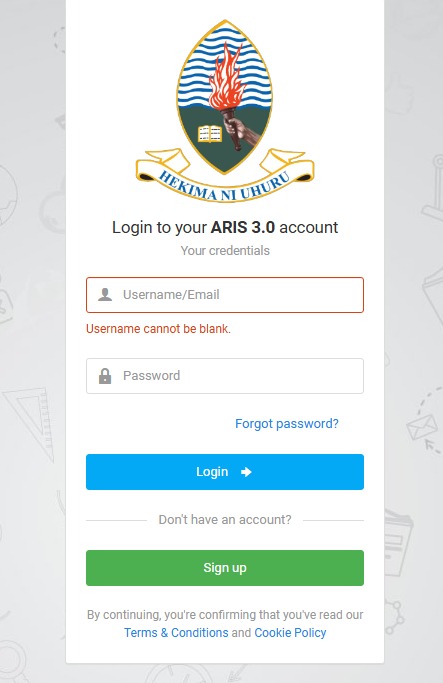
If you’re a student (or staff) at the University of Dar es Salaam, you’ll hear people mention ARIS 3 a lot especially during registration season, when results are released, or when fee payments are due. ARIS 3 is basically the university’s central online system for handling academic and administrative activities. Once you can log in confidently, you can manage most school tasks from your phone or laptop without running around different offices. This guide explains what ARIS 3 is, what you can do inside it, how to log in step-by-step, how to create an account if you’re new, and how to troubleshoot issues like “site can’t be reached,” wrong password errors, or payment confusion.
What Is ARIS 3 UDSM
ARIS 3 is the University of Dar es Salaam’s online academic and administrative management platform. Think of it as a dashboard where your student record and school services meet. Instead of relying on paper processes, ARIS 3 helps the university track student academic records, handle registration, support fee payments, generate control numbers, and allow students to view progress and results when available. For many students, ARIS 3 becomes a “daily” tool because it touches the most important parts of the semester—registration, payments, results, and academic progress tracking.
The Relevance Of ARIS 3 to Students
ARIS 3 is not just a “login portal.” It directly affects your academic flow. When you use it correctly, you can: confirm your registration status, avoid delays caused by missing payments, track your academic history, request control numbers for specific services, and stay updated during key university periods. In short, ARIS 3 helps you stay organized and reduces the stress of last-minute deadlines.
Main Things You Can Do on ARIS 3
Here are the key functions students commonly use inside ARIS 3:
- Manage academic registration: complete semester/annual registration steps based on your program requirements.
- Track academic records: view your academic history and course progress (depending on what your account is allowed to access).
- Request control numbers: generate control numbers for payments or specific administrative actions when required.
- View results: check academic year or semester results when released and made available on the system.
- Handle administrative requests: depending on your status, this can include processes like postponement or other academic instructions provided by the university.
- Payments: many students use ARIS 3 to initiate or track fee-related payments using available channels.
How To Login ARIS 3 UDSM Portal: Step-by-Step
Logging in is simple once you know what is required. Follow these steps carefully:
- Open the ARIS 3 login page (use the official ARIS 3 address provided by the university).
- Enter your username or email in the username field.
- Make sure the username field is not empty—some people tap login without realizing the field is blank.
- Enter your password exactly as it was created (watch out for uppercase/lowercase).
- Click Login to access your dashboard.
- If you forgot your password, use the Forgot password option to reset it.
Fast Login Tips That Will Save You Some Stress
- If you copied your password from notes, double-check there’s no extra space at the beginning or end.
- Try typing the password manually once (autofill can sometimes enter the wrong saved password).
- If login fails repeatedly, do not keep guessing—use password reset early to avoid lockouts.
How to Create ARIS 3 Account.
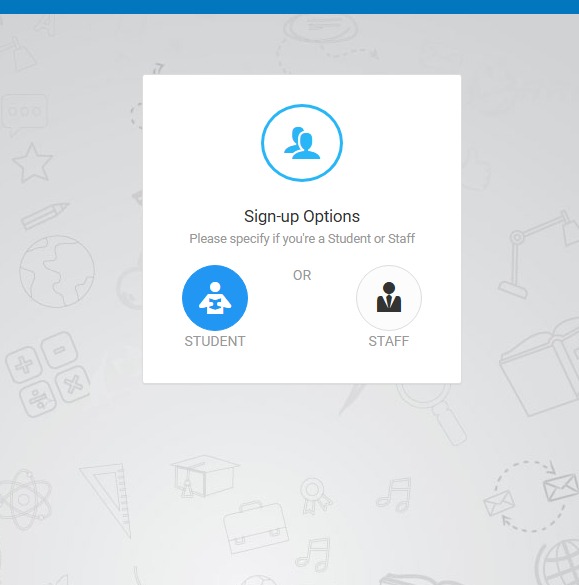
If you’re new (or you’ve never used ARIS 3 before), you may need to create an account. The below process guides you on.
- Visit the official ARIS 3 website and choose Create Account (or similar sign-up option).
- Select the appropriate account type that applies to you.
- Fill in your profile details (names as required, matching your official school records).
- Choose a unique username you can remember.
- Create a strong password and confirm it by entering it again.
- Add your mobile number for verification and recovery.
- Add your email address for communication and password recovery.
- Submit the form to complete registration.
How to Choose a Strong Password (So You Don’t Get Locked Out Later)
Use something you can remember but others can’t easily guess. A good password often includes: uppercase letters, lowercase letters, numbers, and a symbol. Avoid using your first name, phone number, or simple patterns like 12345.
Forgot Password? What to Do
If you can’t remember your ARIS 3 password, don’t panic. Use the Forgot password link on the login page and follow the reset steps. In most cases, the system will request information like your email or phone number to confirm it’s you. After verification, you can create a new password and log in again. If the reset method isn’t working (for example, you no longer have access to the phone number you registered with), the safest option is to contact the appropriate university support office for account recovery.
Common Problems Faced While Accessing ARIS 3 Portal and How to Fix Them
Even when your login details are correct, you can still experience issues—especially during busy periods like registration or results release. Here are the most common problems and what usually works.
1) “This site can’t be reached” or the page won’t load
This often happens when many students are trying to access ARIS 3 at the same time. During huge traffic flow, the server can slow down or temporarily refuse connections. Try these hacks fixes:
- Refresh the page once or twice (don’t overdo it).
- Wait 5–15 minutes, then try again.
- Try logging in during off-peak hours (early morning or late evening usually works better).
- Switch from mobile data to Wi-Fi or vice versa to test network stability.
- If you’re using a browser that’s outdated, switch to a modern browser.
2) Wrong username or password error
If ARIS 3 says your credentials are wrong, do these checks:
- Confirm you’re using the correct username/email (many students have more than one email).
- Turn off caps lock and retype the password carefully.
- If you recently changed your password, ensure you’re not using the old one saved in autofill.
- Use Forgot password if you’re not 100% sure.
3) Account created but can’t log in
Sometimes new users successfully create an account but still can’t log in because the account needs verification or the details entered don’t match school records. If you suspect this, double-check your sign-up information and try again. If it still fails, you may need support assistance to confirm your profile details.
4) Page loads but features don’t show properly
This can happen due to browser cache issues. Fix it by:
- Clearing your browser cache and cookies, then reopening the page.
- Trying a different browser.
- Switching devices (phone to laptop) to confirm whether it’s a device issue.
Making Payments on ARIS 3 Website: What Students Should Know
Many students use ARIS 3 for fee-related processes such as viewing fee status, requesting control numbers, and initiating payments through approved channels. In most cases, the typical flow is: request a control number (where required), use that control number to pay through your preferred payment channel, then return to ARIS 3 to confirm the payment status updates. Payment updates can sometimes take time so if you paid and it doesn’t reflect instantly, give it a little time and then refresh. If it still doesn’t update after a reasonable period, you may need to confirm the payment reference and seek help through the proper university support channel.
How to Use ARIS 3 Without Stress (So You Don’t Miss Deadlines)
Here are some fews tips to make ARIS 3 portal easier to deal with:
- Don’t wait until the final day of registration to log in—traffic is always worse near deadlines.
- Keep your login details safe and private.
- Always download or screenshot important confirmations like registration status or control number details.
- If you notice an error in your profile details, treat it early—don’t wait until results or graduation clearance.
Frequently Asked Questions (FAQs)
1) Is ARIS 3 only for students?
No. Students use it heavily, but staff and administrative units also use it for academic and administrative management.
2) Can I access ARIS 3 on my phone?
Yes. ARIS 3 can be accessed through a mobile browser. A laptop may feel easier for some tasks, but phones work too.
3) Why is ARIS 3 slow sometimes?
Most times it’s because many users are online at once (registration periods, results release, fee deadlines). Trying off-peak hours helps.
4) What should I do if I forgot my password?
Use the “Forgot password” option on the login page. If you can’t access your recovery email/phone, contact the appropriate support unit for recovery.
5) Do I need a control number for every payment?
Not always, but many administrative payments require one. If ARIS 3 provides a control number for a service, use that exact number for payment so it reflects properly.
6) I paid but it’s not showing on ARIS 3—what now?
First, give it some time and refresh. If it still doesn’t reflect, keep your payment evidence and follow the proper university support process for payment reconciliation.
Final Thoughts
ARIS 3 is one of the most important digital tools for University of Dar es Salaam students and staff. Once you understand how it works, it saves you time, reduces stress, and helps you stay in control of your academic journey. The key is simple: keep your login details safe, avoid peak traffic when possible, follow the correct steps for registration and payments, and address problems early instead of waiting until deadlines.